Português · English · 日本語

Team chat with AI agents that work on your projects.

In Cortex, the team conversation and the agents' work stay together: every project and every remote computer has its own conversations, and agents show up on a board you control.

Platforms: Android, iPhone, Windows, macOS, Linux and the browser. Each channel gets each version at its own pace; the full list is in What's new.

Connections and Projects in the sidebar

Version 6.75.490, 6.75.508

Local projects and remote computers (SSH) show up under Connections / Projects, each with its own conversations. In every project you choose Conversation, which only reads and answers, or Code, which edits and runs.

Step-by-step guide →
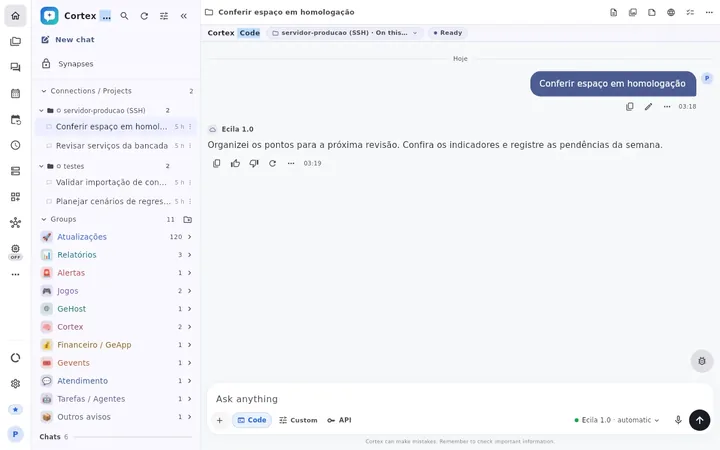
Cortex 6.75.508: sidebar with Connections / Projects and Groups in collapsible sections
Real Cortex screenshot · Version 6.75.508

Agent Studio

Version 6.75.504, 6.75.508, 6.75.511

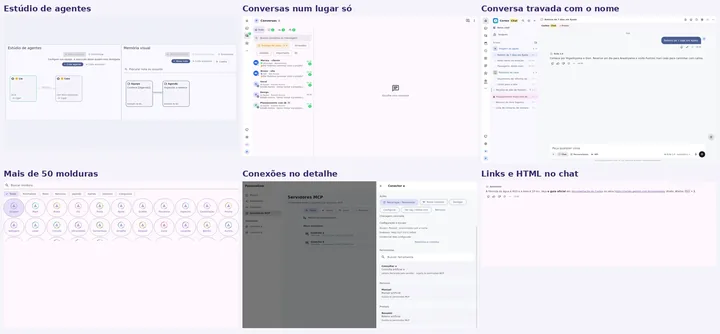
Build agents on a board, start from 14 ready-made templates and see the agents already running on your machines connected over SSH. Turn them on and off with confirmation and Undo; when you copy an agent, passwords and keys are blocked.

Step-by-step guide →
Cortex 6.75.504: Agent Studio, all conversations in one place and a locked conversation
Real Cortex screenshot · Version 6.75.504

AI Rules

Version 6.75.508

One screen that finds and organises the rules you gave your AIs, on your computer and on connected remote computers.

Step-by-step guide →

Collapsible groups and password lock

Version 6.75.498, 6.75.508

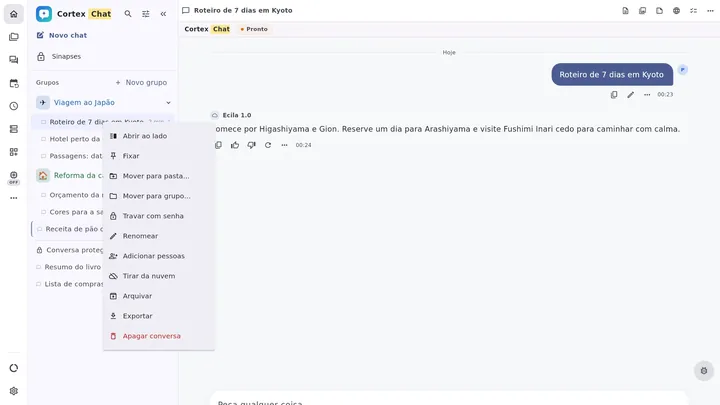
Gather conversations about the same subject into groups with a name, emoji and colour; every sidebar section opens and closes. Lock with a password what is only yours: the content leaves the list, search and notifications. Share a group read-only or to read and chat.

Step-by-step guide →
Cortex 6.75.498: conversation groups in the sidebar and the menu with Move to group, Lock with password and Archive
Real Cortex screenshot · Version 6.75.498

A calendar inside the app

Version 6.75.507, 6.75.511

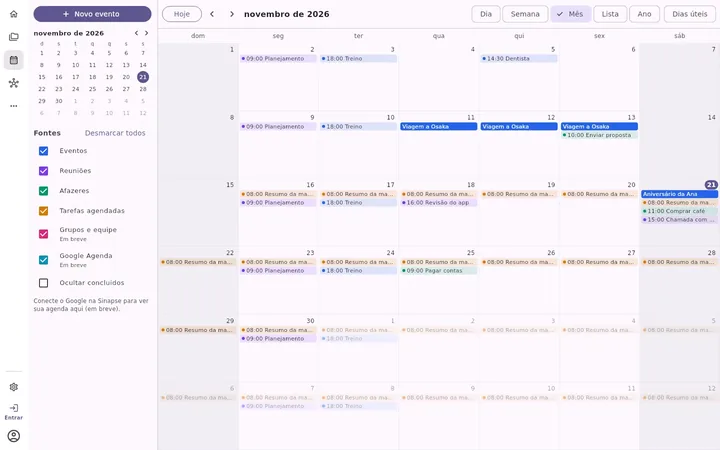
Day, week, month, list and year, with colour-coded events, meetings and to-dos next to your scheduled tasks. Drag to reschedule. Event invites arrive in the chat with Accept, Maybe and Decline.

Step-by-step guide →
Cortex 6.75.507: Calendar month view with events, meetings, to-dos and scheduled tasks
Real Cortex screenshot · Version 6.75.507

Charts, e-mails and files in the chat

Version 6.75.499, 6.75.501

Ask for a chart and it appears in the conversation, with values on tap and export. E-mails and zip files open inside the chat.

Step-by-step guide →

Frequently asked questions

Does the agent touch my server without me seeing?

Actions are tied to the conversation. In the Studio, turning an agent on or off asks for confirmation and has Undo; the confirmation level follows the policy you choose.

Can I discuss the project without editing anything?

Yes. In each project you choose Conversation, which only reads the files and answers, or Code, which edits and runs.

Does copying an agent take my passwords?

No. When you copy an agent to another machine or to your account, passwords and keys are blocked.

Does it work with several remote computers?

Yes. Since 6.75.487, several remote computers can stay connected at the same time.