
Library
Everything born in your chats — images, videos, documents, code, 3D, and audio — in one place, with search and filters.
Open the Library
- All conversations: tap Library in the shortcut rail (on phones, in the menu opened by »).
- Just one chat: inside the chat, open Files from this conversation from the icon at the top.

Find a file
- Use the search at the top: it looks up the file name or the chat name.
- Filter by type: Images, Videos, Documents, Code, 3D, and Audio.
- Filter by source (Made by AI, Sent, Received) and by date.
- Switch between the thumbnail grid and the list in the top corner.

View, save, and share
- Tap an item to see it full screen, with Save, Share, In chat, and Delete.
- Press and hold (or right-click) to select several at once.
Where your files live
What's born in your chats is stored first on your device and shows up on your other devices. The cloud is an extra, for plans that include storage: the size for each plan is in Plans. The On this device tag shows what's already stored locally.
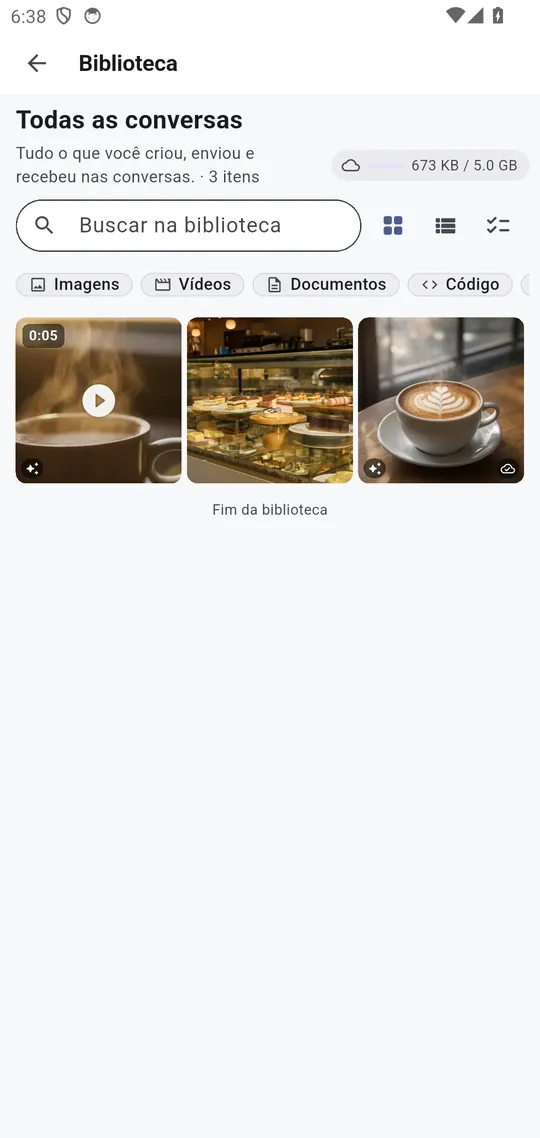
Real screenshots of the app, with a demo account and fictitious data.