
Your AI subscriptions and keys
Use the account you already pay for in Cortex — Claude, ChatGPT/Codex, Gemini, and others — or add an API key.
Besides our own models, Cortex talks to the AIs you already use. Usage with your subscription or key is billed by that provider, not by Cortex.
Connect a subscription (on a computer)
Cortex uses each vendor's official program, installed on your computer. Today you can connect Claude, ChatGPT/Codex, Gemini, GitHub Copilot, Qwen, Z.ai (GLM), and DeepSeek.
- Open Settings › Providers.
- Choose the subscription, for example Claude (my account).
- Tap Connect and sign in through the vendor's official window.
- Once Connected shows up, the subscription is already in the model picker in your chats.
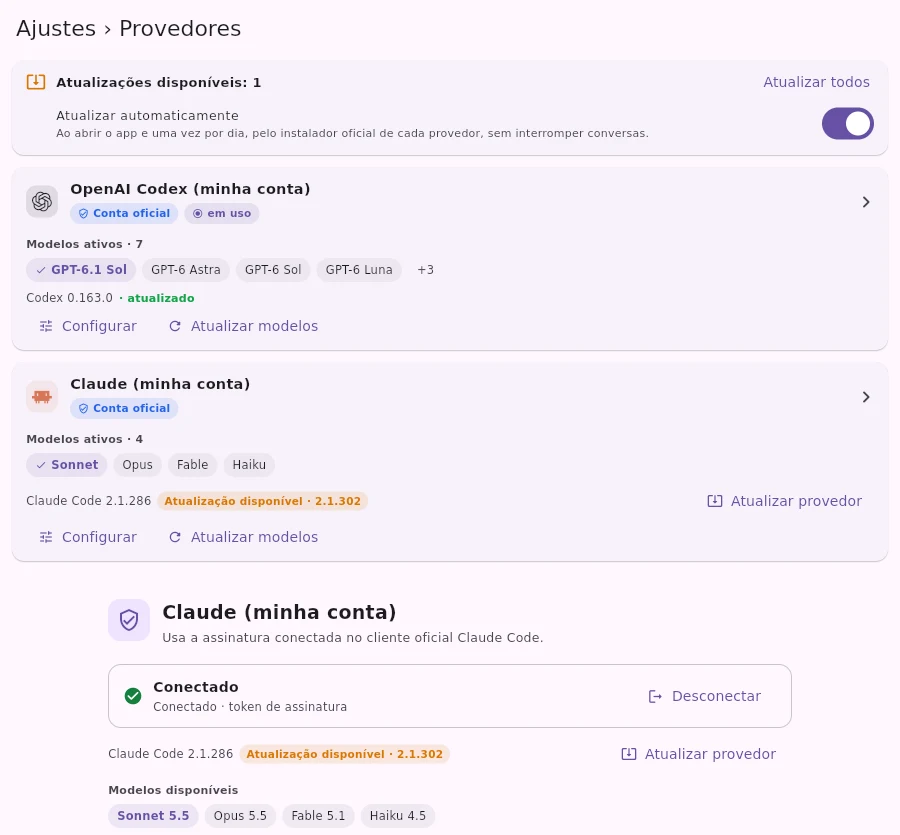
Keep it up to date
- Each subscription shows the installed version and an Update available badge when a new version comes out.
- Update automatically is on by default: when you open the app and once a day, Cortex updates through the official installer, without interrupting your chats.
- If it can't update on its own, the app shows the exact command for you to run.
- After updating, the list brings in the newest models from your subscription.
Images and connectors with your subscription
An image you attach goes along with the request to your subscription's AI. If the chosen model can't read images, Cortex reads the text written in it and tells you it did so. The connectors turned on in the chat also work with subscriptions, always asking for your permission.

Use an API key
Have a key from OpenAI, Anthropic, Gemini, DeepSeek, Groq, OpenRouter, xAI, Mistral, or Z.ai? Or a server compatible with the OpenAI API?
- Open Settings › Providers and tap Add provider.
- Choose the provider (or Custom (OpenAI-compatible) for your own address).
- Paste the key. It's stored in the device's secure vault.
When credit runs out
In Code mode, if the credit or quota on your subscription or key runs out, the chat can continue on the next engine you've authorized. For other errors, Cortex shows the reason and doesn't switch models without you knowing.
Real screenshots of the app, with a demo account and fictitious data.