
Found agents
Find rules, specialists and tools you already use.
Open Customize → Found agents with the radar icon, also available in Settings → Agent profiles.
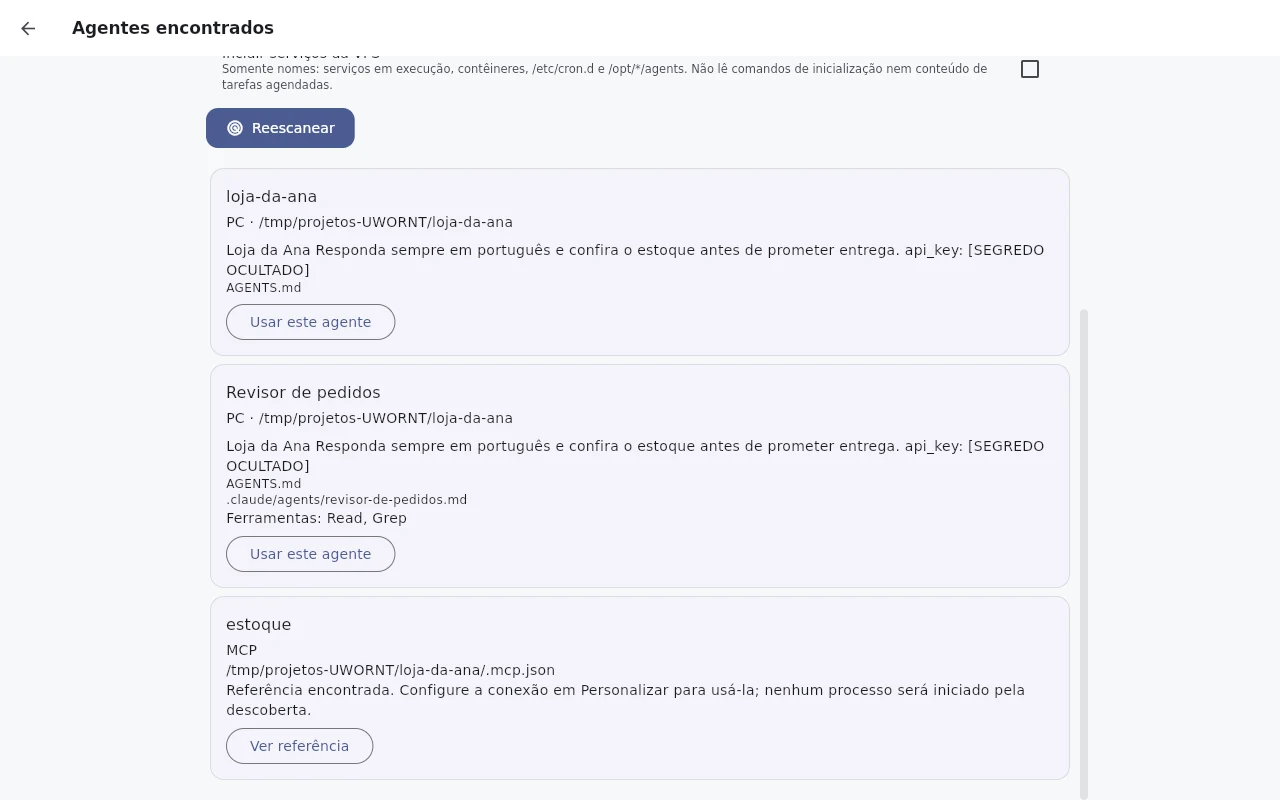
Select folders to search. On your computer, Choose folder adds a folder. An already open SSH connection lets Cortex read selected folders on your VPS. A folder on another computer is never treated as local to your phone.
Before Find agents, open What will be read. Discovery recognizes AGENTS.md, CLAUDE.md, GEMINI.md, Copilot instructions, Cursor rules, Claude agents and Claude/Codex skills. It searches projects up to four levels, skips dependency folders and does not follow links. Personal settings and VPS service names are separate options, initially off.
Discovery is read-only. Results and rules stay on the device. External tool configs provide names only: commands, tokens, variables and headers are not imported, and discovery starts no processes. It excludes .env files, chat history and keys. Common secret formats in rule text are hidden; always review the preview.
Cards show PC/VPS/MCP origin, sources, a rule summary and declared or already known tools. Use this agent opens the complete preview. Confirming creates a chat in the matching project or connector and saves a profile on this device. The rules and location enter the synced chat; your selected model receives the context when you send a message. Cortex permissions still apply. Cortex uses your selected model; finding a Claude file does not automatically change your subscription or provider.
Service names and configs not yet registered appear as Reference found. Set up the connector in Customize before using it. Cortex does not guess how to control a service from its name.
To reuse a profile, open Agent profiles and choose Use this agent in its menu. To refresh the rule snapshot, return to discovery and Scan again. For partial results, choose smaller folders and check permissions and SSH. On a phone, use available SSH connections or connected tools; PC disk discovery runs on that computer.
Real screenshots of the app, with a demo account and fictitious data.