
Reply to connection alerts
Request an action directly from an alert and see the result in the same conversation.
When a connection sends an alert to the Cortex app, you can reply right there. For example, reply “it has been delivered” to a new order alert from your shop. The AI uses that connection’s tools and reports the actual result.
- Add and enable the connection in Customize › MCP servers.
- Open its alert and write your request in the same conversation.
- Check the response. The AI asks for missing details and explains if the connection is disabled on this device.
Refunds, cancellations and deletions require a preview followed by your confirmation. Actions also follow the access level selected in the app.
Previously downloaded alerts receive their matching connection when syncing. If you selected another connection for that conversation, your choice is preserved.
Automatic selection only happens when the destination can be safely identified. If the destination is ambiguous, request the action in a regular chat with the correct connection selected.
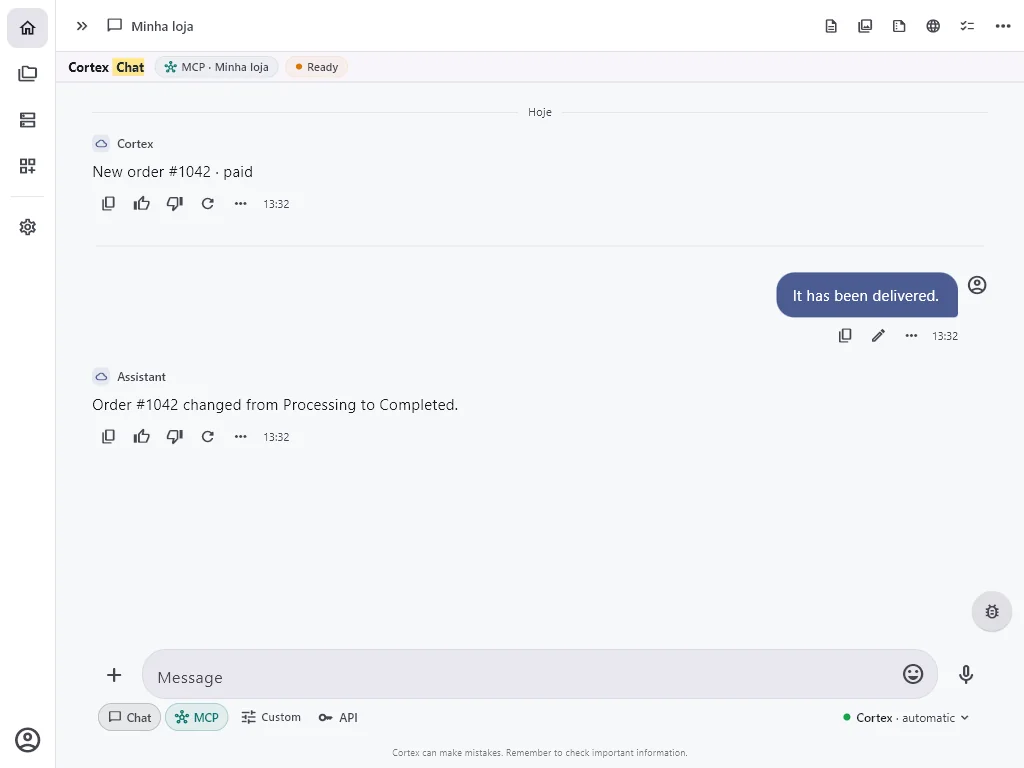
Real screenshots of the app, with a demo account and fictitious data.